

Kubernetes
What is Kubernetes?
Kubernetes is an orchestration tool for containers, and it is designed to automate the deployment, scaling, and management of containerized applications.
Namespaces
Namespaces are a way to divide cluster resources between multiple users (via resource quota).
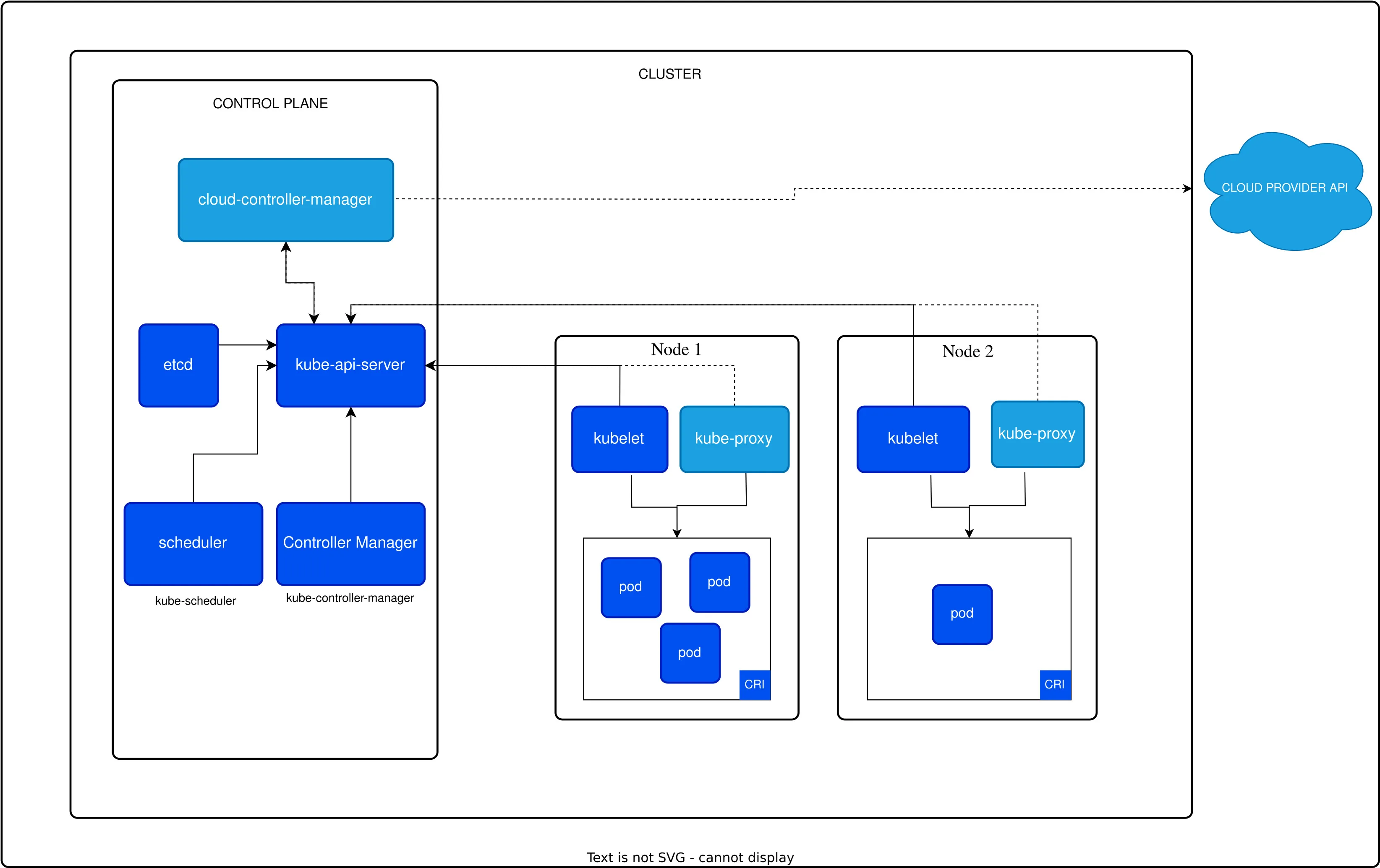
Kubernetes Architecture
Cloud Controller Manager
The cloud controller manager lets you link your cluster into your cloud provider’s API, and separates out the components that interact with that cloud platform from components that just interact with your cluster.
API Server
The API server is a component of the Kubernetes control plane that exposes the Kubernetes API. The API server is the front end for the Kubernetes control plane.
Scheduler
The Kubernetes scheduler is a control plane process which assigns Pods to Nodes. The scheduler determines which Nodes are valid placements for each Pod in the scheduling queue according to constraints and available resources.
Controller Manager
The controller manager is a daemon that embeds the core control loops shipped with Kubernetes. In a default installation, the controller manager runs a number of core control loops, such as the replication controller loop.
etcd
Consistent and highly-available key value store used as Kubernetes backing store for all cluster data.
Node Components
Node
A node is a worker machine in Kubernetes, previously known as a minion. A node may be a VM or physical machine, depending on the cluster. Each node contains the services necessary to run Pods and is managed by the control plane.
Kubelet
An agent that runs on each node in the cluster. It makes sure that containers are running in a Pod.
Kube Proxy
Kube-proxy is a network proxy that runs on each node in your cluster, implementing part of the Kubernetes Service concept. A network proxy is a program that accepts network traffic on a port and forwards it to a destination.
Container Runtime
The container runtime is the software that is responsible for running containers. Kubernetes supports several container runtimes: Docker, containerd, CRI-O, and any implementation of the Kubernetes CRI (Container Runtime Interface).
Pods
A Pod is the basic execution unit of a Kubernetes application. A Pod represents a single instance of a running process in your cluster. Pods contain one or more containers, such as Docker containers. When a Pod runs multiple containers, the containers are managed as a single entity and share the Pod’s resources.
Services
A Service in Kubernetes is an abstraction which defines a logical set of Pods and a policy by which to access them. Services enable a loose coupling between dependent Pods. A Service is defined using YAML or JSON, like all Kubernetes objects.
Deployments
A Deployment provides declarative updates to Pods and ReplicaSets. A Deployment is defined using YAML or JSON, like all Kubernetes objects.
ConfigMaps
Config Maps is like Secret, but it is used to store non-sensitive data.
Secrets
A Secret is an object that contains a small amount of sensitive data such as a password, a token, or a key.
Volumes
A volume is a directory, possibly with some data in it, which is accessible to the containers in a pod.
StatefulSets
StatefulSets are a way to run stateful applications on Kubernetes.
DaemonSets
A DaemonSet ensures that all (or some) Nodes run a copy of a Pod.
Jobs
A Job creates one or more Pods and ensures that a specified number of them successfully terminate.
CronJobs
A CronJob creates Jobs on a repeating schedule.
Persistent Volumes
A PersistentVolume (PV) is a piece of storage in the cluster that has been provisioned by an administrator or dynamically provisioned using Storage Classes.
Role-Based Access Control (RBAC)
Role-based access control (RBAC) is a method of regulating access to computer or network resources based on the roles of individual users within your organization.
ReplicaSets
A ReplicaSet’s purpose is to maintain a stable set of replica Pods running at any given time.
Kubernetes Objects
Kubernetes objects are persistent entities in the Kubernetes system. Kubernetes uses these entities to represent the state of your cluster. Specifically, they can describe:
-
What containerized applications are running (and on which nodes)
-
The resources available to those applications
-
The policies around how those applications behave, such as restart policies, upgrades, and fault-tolerance
-
Kubernetes deploy simple application
-
Deploy container with yaml file
-
Deploy storage with yaml file
-
Deploy Guestbook with yaml file
Kubelet Commands
kubectl apply is best to use to take advantage of version control, while kubectl create is a good option if you are experimenting or troubleshooting.
# Get all pods$ kubectl get pods$ kubectl get pods
# Get all services$ kubectl get services$ kubectl get svc
# Get all deployments$ kubectl get deployments
# Get all nodes$ kubectl get nodes
# Get all namespaces$ kubectl get namespaces
# Get all configmaps$ kubectl get configmaps
# Get all secrets$ kubectl get secrets
# Get all persistent volumes$ kubectl get pv
# Get all storage classes$ kubectl get sc
# bash into a pod$ kubectl exec -it <pod-name> -- /bin/bash
# Get logs of a pod$ kubectl logs <pod-name>
# Get events$ kubectl get events
Deployments File
# Create a deployment with a yaml file$ kubectl create -f deployment.yaml
# Create a deployment$ kubectl create deployment nginx --image=nginx:1.14.2apiVersion: apps/v1kind: Deploymentmetadata: name: nginx-deployment labels: app: nginxspec: replicas: 3 selector: matchLabels: app: nginx template: metadata: labels: app: nginx spec: containers: - name: nginx image: nginx:1.14.2 ports: - containerPort: 80Services File
# Create a service with a yaml file$ kubectl create -f service.yaml
# Create a service$ kubectl expose deployment nginx-deployment --type=NodePort --name=nginx-serviceapiVersion: v1kind: Servicemetadata: name: nginx-servicespec: selector: app: nginx ports: - protocol: TCP port: 80 targetPort: 80 type: NodePortVolume File
# Create a Volume with a yaml file$ kubectl create -f volume.yaml$ kubectl apply -f volume.yaml
# Delete a Volume with a yaml file$ kubectl delete volume <volume-name>apiVersion: v1kind: Podmetadata: name: configmap-podspec: containers: - name: test image: busybox:1.28 command: ['sh', '-c', 'echo "The app is running!" && tail -f /dev/null'] volumeMounts: - name: config-vol mountPath: /etc/config volumes: - name: config-vol configMap: name: log-config items: - key: log_level path: log_level