

Cloud Concepts (Azure)
What is Cloud Computing
All the practice of using a network and remote servers hosted on the internet. (On-Premises vs Cloud Provider)
Type of server topology:
- Dedicated Server: one server for one app dedicated to one business.
- Virtual Private Server: one server for multiple apps (virtualized machine) dedicated to one business.
- Shared Hosting: one server for multiple apps dedicated to multiple business.
- Cloud Hosting: multiple servers, multiple apps, multiple business (Flexible, Scalable, Secure)
Common Cloud Services
Hundreds of cloud services such as:
- Compute: virtual computer, run application, programs and code
- Networking: create virtual network (internet connection, network isolation)
- Storage: virtual hard drive to store files
- Databases: virtual database to store data, or database for applications
What is Microsoft and Azure
Microsoft: software, OS, phones, game consoles, search engine, cloud services, … Azure: Cloud provider of Microsoft
Benefits of Cloud Computing
Benefits:
- Cost-effective: Pay for what you use
- Global: Accessible anywhere around the world
- Secure: Cloud services are secured by default
- Reliable: data backup, disaster recovery, data replication
- Scalable: increase or decrease resources on demand
- Elastic: automate scaling during spikes and drop in demand
- Current: software and services are always updated and upgraded
Types of Cloud Computing
SaaS: Software as a Service (for customers)
Products and software managed and maintained by the service provider (Salesforce, Office 365, Gmail)
PaaS: Platform as a Service (for developers)
Focus on the deployment and management of our apps, all the infrastructure, hardware, OS are managed by the cloud provider (GitLab, Kubernetes, Docker, GitHub)
IaaS: Infrastructure as a Service (for architects)
Create infrastructures through cloud service, provide access to networking features, computers, data storage, database, the datacenters, and hardware are managed by the cloud provider (Azure, AWS, GCP, Oracle)
Types of Cloud Computing Responsibilities
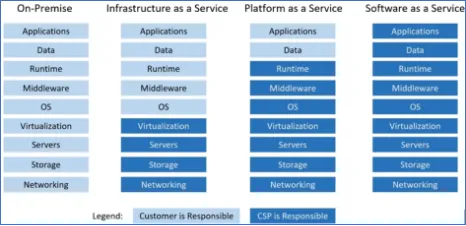
Cloud Deployment Models
Public Cloud: Cloud Provider
Private Cloud: On-Premises (OpenStack)
Hybrid Cloud: connect Public Cloud and Private Cloud thanks to an ExpressRoute.
Cross-Cloud: connect multiple cloud providers (AWSßàAzure) thanks to Azure-Arc
Total Cost of Ownership
| On-Premises (CAPEX) | Azure (OPEX) |
|---|---|
| Implementation | Implementation |
| Configuration | Configuration |
| Training | Training |
| Physical Security | - |
| Hardware | - |
| IT Personal | - |
| Maintenance | - |
75% Saving using cloud provider services beside on-premises infrastructure.
CAPEX vs OPEX
| CAPEX (Capital Expenditure) | OPEX (Operational Expenditure) |
|---|---|
| Storage Costs (computers, hard drives) | Leasing cloud services |
| Disaster Recovery Costs | Training employees |
| Datacenter Costs (rent, cooling, security) | Paying for cloud support |
| Disaster Recovery Costs | Billing on cloud usage |
| Datacenter Costs (rent, cooling, security) | - |
| Technical Personal | - |
Cloud Architecture Terminologies
Availability (high availability): ability to ensure a service remain available.
Scalability: ability to grow rapidly or unimpeded
Elasticity: ability to shrink or grow to meet the demand
Fault Tolerance: ability to prevent a failure.
Disaster Recovery (high durability): ability to recover after a failure.
High Availability
High Availability is the ability to ensure the availability of our services by deploying them on multiple Availability Zone (datacenters) to ensure the availability if a datacenter become unavailable from a failure.
Common: deploy on 3 availability zones, Load Balancer charge to distribute the traffic across the different availability zones. (Example: Region France center = 3 Availability Zones (datacenters))
High Scalability
Scalability is the ability to increase the capacity and the performance.
Vertical Scaling: add RAM, hard-drive, CPU, …
Horizontal Scaling: add servers, duplicate applications, …
High Elasticity
Ability to automatically increase or decrease the capacity according to the demand.
Horizontal Scaling:
- scaling out: add more servers.
- scaling in: remove more servers
High Durability
Capacity to recover from a disaster, prevent the loss of data (Disaster Recovery (DR))
Evolution of Compute
Dedicated Services
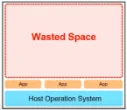
Make good choices to avoid:
- To use an entire server for a single customer
- To get more capacity than necessary (overpay, underuse)
- Limitation from the OS
- Multiple apps on a single server, conflicts on resource sharing
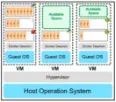
Virtual Machines
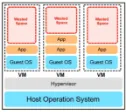
Virtual Machines allow:
- Run multiple virtual machines on one machine.
- Hypervisor (Technology to run VMs)
- A physical server shared with multiple customers.
- Overpay for underuse.
- Limited by the Guest Operating System
- Multiple apps on a single server, conflicts on resource sharing
Containers
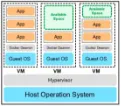
Virtual Machine running multiple containers.
- No space allocation
- No resources sharing conflicts.
- Same OS shared
- More cost efficient (use necessary space)
Functions
Functions are used to execute a piece of code.
- Serverless compute
- Very cost-effective
- Run into containers.
Global Infrastructure
Regions and Geographies
Region: group of multiple datacenters called Availability Zones (generally 3 AZs)
Azure: 58 Regions across 140 Countries
Geographies: group of multiple regions
Paired Regions
Each region has a region pear 300 miles away, to prevent from outages and disaster recovery.
Azure Geo-redundant Storage (GRS) to replicate data to the region paired with. (Ensure Durability)
Region Types and Service Availability
Recommended region: broadest range of service, availability zones.
Alternate region: not designed to support availability zones.
General Availability (GA): server ready to be used by everyone.
Azure Cloud Services are grouped in 3 categories of availability:
- Foundational: available immediately on Recommended and Alternate Region \
- Mainstream: available immediately on Recommended Region (on demand in Alternate Region) \
- Specialized: available on demand only in Recommended and Alternate Region \
Special Regions
US Government and China Government (all datacenter in a secret location)
Availability Zones
Availability Zone: physical location with datacenter
A common practice is to run workloads in at least 3 Availability Zones (High Availability)
AZ Supported Regions
Region without availability zones is called Alternate or Other Region
Availability Sets Fault and Update Domains
Availability Zone: combination of fault domain and update domain
- Fault Domain: Group of hardware to avoid a single point of failure in the AZ. (avoid spreading the failure)
- Update Domain: Azure never updates two update domains at the same time to keep your resources available, so they need to be running on different update domain.
- Availability Sets: place to ensure that we place or VM in a different Fault Domain and Update Domain
Technology Overview
Computing Services
- Azure Virtual Machines: Windows of Linux machines (VM), choose OS, Memory, CPU, Storage
- Azure Container Instances: run containerized app without provisioning server or VM.
- Azure K8S: deploy, run, and managed containerized applications (mainly docker containers).
- Azure Service Fabric: package, deploy and manage containers such as K8S but not only with Docker.
- Azure Function: piece of code which is running without provisioning server.
- Azure Batch: plan, schedule, execute jobs in parallel.
Storage Services
- Azure Blob Storage: store blob files, pay only for what we store.
- Azure Disk Storage: virtual volume (HDD or SSD) attaches to a VM.
- Azure File Storage: shared volume, manage and access like a file server.
- Azure Queue Storage: data store for messaging queue between application.
- Azure Table Storage: NoSQL store.
- Azure Databox Heavy: rugged service to move Tera or Petabytes of data.
- Azure Archive Storage: service to remain long term data (years)
- Azure Data Lake Storage: store structured and unstructured data (SQL/NoSQL)
Database Services
- Azure Cosmos DB: fully managed NoSQL databases, guarantee of 99,999% availability.
- Azure SQL Database: fully manage MS SQL database.
- Azure Database for MySQL / PSQL / MariaDB: fully managed MySQL, PSQL, MariaDB database with high availability and security
- SQL Server on VM: host SQL Server apps in the cloud (used for the lift and shift)
- Azure Synapse Analytics (Azure SQL Data Warehouse): fully managed data warehouse (no extra cost)
- Azure Database Migration Service: migrate database without application code changes.
- Azure Cache for Redis: store caches
- Azure Table Storage: NoSQL store, unstructured data.
Application Integration
- Azure Notification Hub: send notification to any platform from any backend.
- Azure API Apps: build and consume API in the cloud.
- Azure Service Bus: create a messaging bus to allow different app to communicate each other.
- Azure Stream Analytics: real-time analytics from data.
- Azure Logic App: schedule, automate and orchestrate tasks, businesses process and workflows.
- Azure API Management: Put in front of an existing API to add additional functionalities.
- Azure Queue Storage: data store for messaging queue between application.
Developer and Mobile Tools
- Azure SignalR Service: real-time messaging (notification) for web and mobile app.
- Azure App Service: allow developer to not think about underlying infrastructure (PHP, NodeJS, Python, Ruby, .Net).
- Visual Studio: IDE
- Xamarin: Mobile App Framework
Azure DevOps Services
- Azure DevOps: Plan smarter, collaborate.
- Azure Boards: Kanban/Scrum, provide tools to plan, track, discuss work across teams.
- Azure Pipelines: Build, test, deploy with CI/CD
- Azure Repos: Git repos such GitHub and GitLab
- Azure Test Plans: provide manual testing tools (on browser)
- Azure Artifacts: create, host, share packages between teams.
- Azure DevTest Labs: create a dev-test environments.
Azure Resource Manager ARM
Infrastructure as Code (IaC): create, manage resources and infrastructures via code (HCL/JSON).
Azure Resource Manager (ARM): create resources via JSON.
Azure QuickStart Templates
Azure QuickStart Templates: library powered by the community and partners to help customers to quickly launch new project by providing scripts.
vNets and Subnets
Virtual Network (vNet): a logically isolated section of an Azure Network where we can launch Public/Private Subnets in which we launch Azure Resources. (Range of IP using CIDR Range)
Cloud Native Networking Services
Azure DNS: provide ultra-fast DNS responses and ultra-high domain availability.
Azure Virtual Network (vNet): create a logical isolated section of the Azure network.
Azure Load Balancer: OSI Level 4 (Transport) forward traffic on identical resources to avoid overload.
Azure Application Gateway: OSI Level 7 (HTTP), apply WAF (Web Application Firewall), forward traffic on specific URL to request the right resource.
Network Security Groups: virtual firewall for the Subnet
Enterprise Hybrid Networking Services
Azure Front Door: scalable and secure entry point of our global application
Azure ExpressRoute: A connection between our On-Premises to Azure cloud (50Mbps to 10Gbps)
Virtual WAN: a network service to logically connect Virtual Networks
Azure Connection: VPN connection to connect 2 Azure local network.
Virtual Network Gateway: VPN connection between Azure Virtual Network and Local Network.
Azure Traffic Manager
Azure Traffic Manager: quickly and efficiently direct incoming DNS requests based on a routing method:
- Route traffic to the near servers to reduce latency.
- Fail-over to redundant systems in case primary systems become unhealthy.
- Route random customers (20%) to get access to a Beta version.
Azure DNS
Azure DNS: host and manage domains names.
Azure Load Balancer
Azure Load Balancer: OSI Level 4 (Transport) forward traffic across a group of resources to avoid overload.
- Public Load Balancer: forward traffic incoming from the internet to public servers.
- Private Load Balancer: forward traffic incoming from the internet to private servers.
Scale Sets
Ability to automatically increase or decrease the number of servers based on the CPU, memory, disk, or network performance.
IoT Services
Internet of Things (IoT): connect, collect, and exchange data from multiple devices connected.
IoT Central: connect IoT devices to the cloud.
IoT Hub: Get highly secure and reliable communication between IoT app and devices managed.
IoT Edge: Fully manage service based on IoT Hub (allow to save money)
Big Data and Analytics Service
BigData: massive volume of structure or unstructured data too large to use traditional database.
Azure Synapse Analytics: Enterprise data warehousing and big data analytics, can run SQL queries.
HDInsight: Run analytics software such as Hadoop, Kafka, Spark
Azure Databricks: software made by Spark and optimized for the Azure cloud services.
Data Lake Analytics: storage repository that holds large amount of data.
AI ML Services Introduction
Azure Machine Learning Service: service for that simplifies running AI/ML related workloads allowing us to build flexible Pipelines to automate workflow. (Python, R, TensorFlow)
AI ML Services
Personalizer: deliver a personalized experience for every user.
Translator: multi-language text translator to website tools.
Anomaly detector: detect anomalies in data and troubleshoot issues.
Azure Bot Service: serverless bot service that scales on demand.
Form Recognizer: Automate the extraction of text, key/value pair from documents.
Computer Vision: Easily customize computer vision models for your unique use case.
Language Understanding: Build natural language understanding into apps, bots, IoT devices.
Q/A Maker: create a conversational question/answer bot.
Text Analytics: Extract information from text
Content moderator: moderate text and images to provide a safer, more positive user experience.
Face: detect and identify people and emotions in images.
Ink Recognizer: Recognize digital ink content, such as handwriting, shapes and document layout.
Serverless Services
Serverless: means that the infrastructure and OS is taking care by the Cloud Provider
Serverless services:
- Azure Function: run small amounts of code.
- Blob Storage: Just upload files.
- Logic Apps: build serverless workflow build on Azure Functions
- Event Grid: messaging system to allow to react to events and trigger Azure Functions
Security
Azure Trust Center
Web site made by Microsoft to share trust information about multiple topics such as Security, Privacy, GDPR, Data location, Compliance.
Compliance Programs
CJIS | CSA | GDPR | EU personal data | HIPAA, etc…
Azure Active Directory
Azure Active Directory: cloud-based identity and access management service (sign in and access resources). We can implement Single-Sign On (SSO). Azure Active Directory, help employees to connect to access and use resources.
External Resources: Office 365, Azure Portal, SaaS applications
Internal Resources: Applications within internal network/on-premises
MFA
Multi-Factor Authentication: second way to confirm identity during a connection attempt.
Azure Security Center
Azure Security Center: infrastructure security management system, is a set of tools for monitoring and managing the security of our infrastructure.
Key Vault
Azure Key Vault help us to safeguard our cryptographic keys and other secrets key used by cloud apps and services (secret key, tokens, passwords, SSL certificates, API keys)
The keys can be protected by software or by HSM (hardware security module).
Azure DDoS Protection
2 solutions of DDoS Protection:
- DDoS Protection Basic (free and by default)
- DDoS Protection Standard (metrics, alert, reporting, expert support)
Azure Firewall
Network security service to protect azure virtual network resources. Define which traffic is allowed or not.
Azure Information Protection
Azure Information Protection (AIP): protect sensitive information (email, documents), restricted access and rights, integrated security in Office apps. (Just a button to click)
Application Gateway
Application Gateway is a web traffic load balancer that re-route traffic based on URL.
Advanced Threat Protection ATP
ATP is a cloud-based security solution that contain (on-premises Active Directory):
- Intrusion Detection System (IDS)
- Intrusion Protection System (IPS)
Microsoft Security Development Lifecycle SDL
The Microsoft SDL introduces security and privacy considerations throughout all phases of the development process, helping developers build highly secure software, address security compliance requirements, and reduce development costs.
Azure Policies
Azure Policy: service used to create, assign, manage policies (JSON)
Role Based Access Control RBAC
Deliver access (read, grant, create/update/delete) to a defined role.
Lock resources
Lock resources: service that may be applied to subscription, resource group, resource, to prevent to an accidental deletion or modification of critical resources.
- CanNotDelete
- ReadOnly
Management Groups
Managing multiple subscriptions

Azure Monitor
Service (Dashboard) to collect, analyzing, acting on telemetry about our cloud and on-premises environments.
Service Health
Service to provide information about current and upcoming issues, planned maintenance by Azure, outage services, information the health of our cloud resources.
Azure Advisor
Service (dashboard) provide personalized recommendations for all subscriptions for the following categories:
- High Availability
- Security
- Performance
- Cost
- Operational Excellence
Billing and Pricing
Service Level Agreements
SLA describes uptime and connectivity represented as a percentage (99,999%)
SLA per service
Service Credits
Get a discount/compensation for an under-performing service based on the SLA.
Composite SLAs
A composite SLA is when you combine SLA percentage for combined services.
(Ex: 99,95% * 99,99% = 99,94%)
TCO Calculator
Estimate cost saving that can be realized by migrating the workload to Azure.
Azure Marketplace
Place where apps and services made available by third publishers.
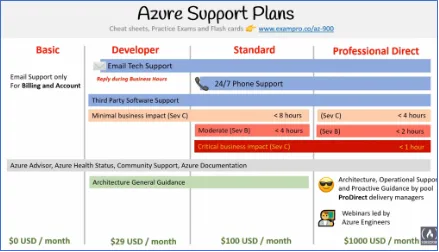
Azure Support
Azure Licensing
Use Microsoft licenses on Azure (SQL Servers/Windows Servers)
Azure Subscriptions
Free Subscription: 200$ credits free for 30 days
Pay-As-You-Go (PAYG) Subscription: pays at the end of the month.
Enterprise Agreement: discount price for licenses and cloud services
Student subscription: 100$ credits free for 12 months
Pricing Calculator
Estimate costs for Azure Products (azure.microsoft.com/pricing/calculator)
Azure Cost Management
Perform cost analysis, visualized the spending of azure cloud resources.
Create budgets, set budget thresholds, program alert.